
Hoe kunnen wij je helpen?
-
General Settings
-
- Articles coming soon
-
- Articles coming soon
-
Create and adjust projects
-
- Articles coming soon
-
- Articles coming soon
-
- Articles coming soon
-
Algemene instellingen
-
Projecten maken en aanpassen
LesLinq biedt uitgebreide rapportages om de voortgang van E-learningprojecten en de betrokkenheid van deelnemers te volgen.
1. E-learningrapport
Dit rapport geeft een overzicht van elke uitgezette E-learning en bevat:
- Statusoverzicht
- Overdue
- To do
- Opened
- Completed
- Totaal uitgegeven certificaten
- Aantal participants

Door op de titel van een E-learning te klikken, krijg je toegang tot gedetailleerde informatie zoals:
- Welke deelnemers de E-learning hebben voltooid
- Wie een certificaat hebben ontvangen
- Een klikbare “Pogingen”-sectie met:
- De antwoorden die elke deelnemer heeft ingediend
- De bijbehorende scores

2. Participant Rapport
Dit rapport richt zich op de activiteit van individuele deelnemers en bevat:
- Status van toegewezen projecten (Achterstallig, Te doen, Voltooid, Certificaten)
- Een gedetailleerde geschiedenis van de acties van de deelnemer binnen het project

Daarnaast kun je:
- Op de naam van de deelnemer klikken om naar de detailpagina van de deelnemer te gaan
- Op “Pogingen” klikken om te zien:
- Welke antwoorden zijn gegeven
- Welke scores per poging zijn behaald

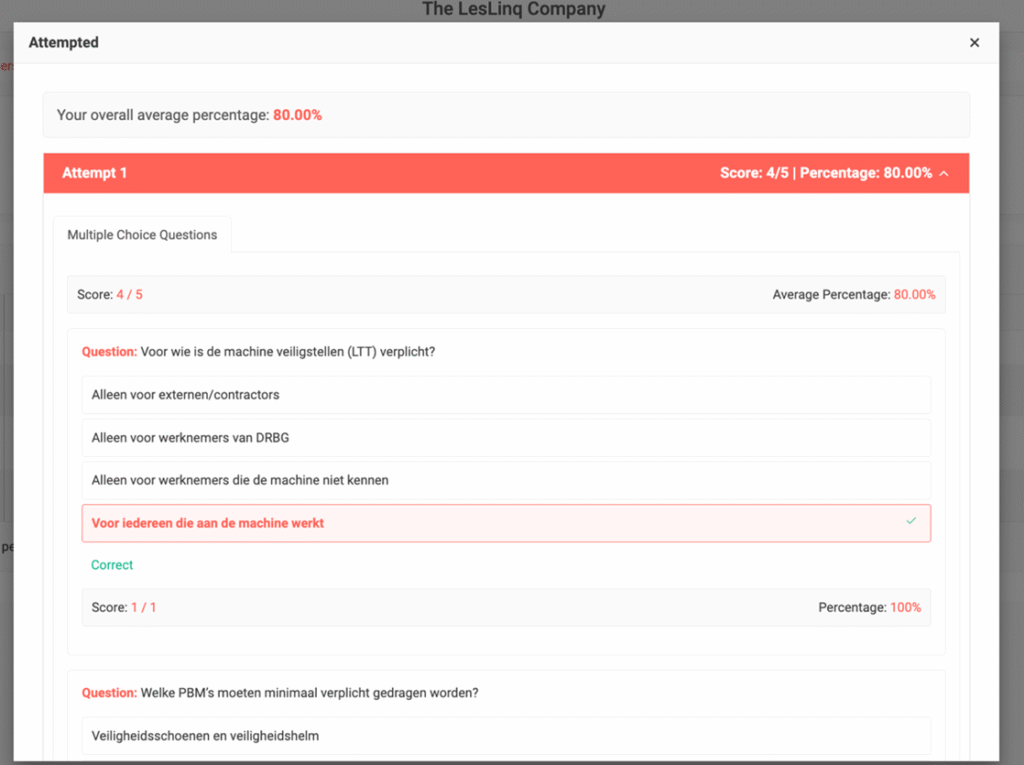
- Op het certificaaticoon klikken om een voorbeeld van het certificaat te bekijken

- Op de projectnaam klikken om naar de detailpagina van de betreffende E-learning te gaan
Tabelkenmerken
- De kolommen in de tabel kunnen worden aangepast en verplaatst naar wens van de gebruiker
- Filters maken het mogelijk om specifieke gegevens te bekijken
LesLinq biedt ook maatwerkrapportages die zijn afgestemd op de wensen van individuele klanten.