
Content Creation Tool / Authoring Tool
Build instructions that reach the workfloor
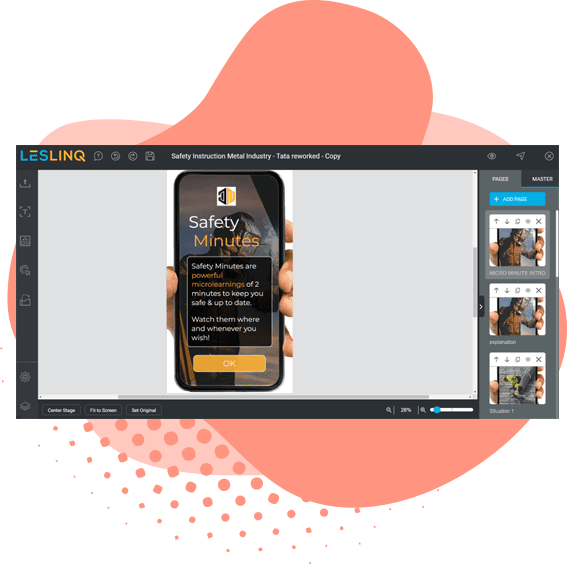
No designer needed. No technical skills required. With the authoring tool, you build a safety instruction everyone understands in minutes. In any language, on any device.
Who's the authoring tool for, and who isn't it for?
The authoring tool is powerful, but not essential for everyone. Here's the honest breakdown.
A good fit if you...
Want to create your own content
Need specific instructions that aren't available in a library
Want to build content in your own house style
Want to turn existing PowerPoints or PDFs into interactive content
Want to scale quickly without bringing in an external party every
Snel wil schalen zonder elke keer een externe partij in te schakelen
Less relevant if you...
Just want to distribute existing content
Already use ready-made modules from the LesLinq library
Have no need for custom instructions
Focus entirely on distribution and reporting
Don't have the time or capacity for content management
Not sure?
Book a demo. We'll show you whether the ready-made library covers your situation or whether the authoring tool makes the difference. It only takes a few minutes to find out.
What you can do with the authoring tool
Build it yourself, no designer needed
Open canvas
Free-form design, no fixed templates. You decide the layout, screen by screen.
PPT, PDF, PSD & AI import
Import existing files and make them interactive, no need to start from scratch.
Reusable interactive templates
Free-form design, no fixed templates. You decide the layout, screen by screen.
Reach everyone, in any language
Automatic translation (30+ languages)
The instruction is automatically translated into the participant's preferred language.
Text-to-speech
Text is read aloud automatically via ReadSpeaker, also useful for people with limited literacy.
Works on any device
No app, no login for the participant. Opens straight in the browser.
Test knowledge and certify
Question module
Multiple question types: multiple choice, drag-and-drop, hotspots. Each with its own styling.
Certificates
Set a minimum passing score. The participant automatically receives a certificate in their own name.
Learning paths and scenarios
Create branching routes based on answers. The content adapts to the participant's level.
Integrate with your existing systems
SCORM export
Export to SCORM and connect to your own LMS.
HTML export
Export as a standalone HTML5 module for maximum flexibility in your own environments.
Interactive video
Add questions and hotspots to video: YouTube, Vimeo, or your own upload.
Key Features at a Glance

Open Canvas
The open canvas provides a lot of freedom and flexibility in designing interactive learning materials.

Question Module
Test the knowledge with different question types and a variety of styling options.

Certificates
Reward learners with a certificate upon successful completion.

Automatic Translations
Microlearnings are automatically translated into the learner’s preferred language.

Text to speech
Text is automatically read aloud using ReadSpeaker’s Text-to-Speech module.

Buttons
Add buttons to your design and customize their size, color, borders, corners, and more.

Images
Upload your images to the library and easily add them to your design. You can also use GIF files for extra engagement!

Shapes
Add rectangles, triangles, circles, and polygons to your design and customize them with your own styling.

Text
Gebruik voorgedefinieerde lettertypes of upload je eigen webfont.

Video Integration
Add Vimeo or YouTube videos, or record your own directly in LesLinq.

Audio support
Upload audio clips or record directly in the platform.

ICONS
A library of icons that you can add to your design for free.

ANIMATIONS
Add interactive effects like fade, zoom, and slide-in elements.

ACTIONS
With actions, you can add unique effects to any element on click, hover, or rollover.

PATH ANIMATION
Use the pen or pencil tool to animate elements along a custom path.

STYLING
For each individual element, you can apply custom styling options, such as color or transparency.

TAGGING SYSTEM
Organize projects and learners with a powerful tagging feature.

PPT, PDF, PSD and AI Import
Seamlessly import PowerPoint, PDFs, Photoshop, and Illustrator files.

Learning Paths
Use Scenario-Based Learning to create custom learning journeys.

SCORM EXPORT
Export your LesLinq project as a SCORM file and integrate it with your own LMS, such as aNewSpring or Moodle.
Ready to discover if LesLinq is the right fit?
We’d love to give you a free online tour of LesLinq, no strings attached. Together, we’ll explore your needs and see if LesLinq is the right solution for your organization.